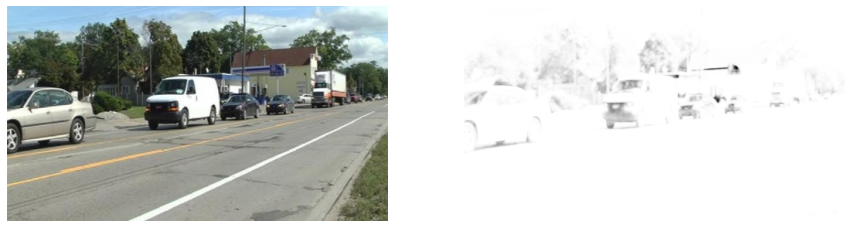
!wget -nc --no-cache -O init.py -q https://raw.githubusercontent.com/rramosp/2021.deeplearning/main/content/init.py
import init; init.init(force_download=False);
import numpy as np
import tensorflow as tf
import matplotlib.pyplot as plt
from skimage.io import imread
from scipy import signal
%matplotlib inline
tf.__version__'2.4.1'Convolutions of functions
A convolution is a mathematical operations that receives as input two functions and produces as output another function.
The intuition is that one input function sweeps over the second input function and they get multiplied along the way.
f = lambda x: ((x>1) & (x<2)).astype(int)
g = lambda x: ((x>1) & (x<2)).astype(int)

x = np.linspace(-1,4,1000)
c = np.convolve(f(x),g(x), "same")
c = c/np.max(c)
plt.figure(figsize=(8,6))
plt.subplot(311); plt.plot(x,f(x), label="f"); plt.legend()
plt.subplot(312); plt.plot(x,g(x), label="g"); plt.legend()
plt.subplot(313); plt.plot(x,c, label="convolution"); plt.legend()
plt.tight_layout()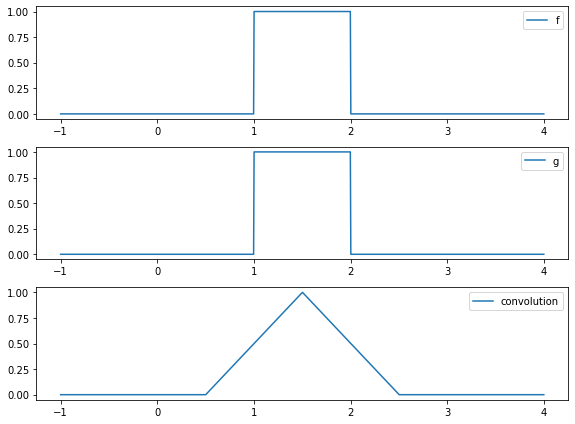
Convolution is just multiplication and adding
In a discrete setting, integration becomes summation.
a = np.r_[0,0,1,1,1,0,0]
b = np.r_[0,0,1,1,1,0,0]
np.convolve(a,b)
array([0, 0, 0, 0, 1, 2, 3, 2, 1, 0, 0, 0, 0])observe each convolution step is just an element by element multiplication of vectors and a sumation of the resulting elements.
for i in range(len(a)*2-1):
    pa, pb = (a[:i+1], b[-i-1:]) if i < len(a) else (a[i-len(a)+1:], b[:-(i-len(a))-1])
    print ((pa*pb).sum(), "=", pa, "*", pb)
0 = [0] * [0]
0 = [0 0] * [0 0]
0 = [0 0 1] * [1 0 0]
0 = [0 0 1 1] * [1 1 0 0]
1 = [0 0 1 1 1] * [1 1 1 0 0]
2 = [0 0 1 1 1 0] * [0 1 1 1 0 0]
3 = [0 0 1 1 1 0 0] * [0 0 1 1 1 0 0]
2 = [0 1 1 1 0 0] * [0 0 1 1 1 0]
1 = [1 1 1 0 0] * [0 0 1 1 1]
0 = [1 1 0 0] * [0 0 1 1]
0 = [1 0 0] * [0 0 1]
0 = [0 0] * [0 0]
0 = [0] * [0]
the mode argument to convolve regulates padding
np.convolve(a,b, mode="same")array([0, 1, 2, 3, 2, 1, 0])Of course, the functions can have any values, and not necessarily be the same, and we assume there is infinity zero padding on both arguments, so they do not have to be the same size.
In this case:
ais considered the source signalbis considered the filter
a = np.r_[0,0,1,1,1,0,0]
b = np.r_[1,0,1]
np.convolve(a,b)
array([0, 0, 1, 1, 2, 1, 1, 0, 0])Convolution with images
It is simply sweeping in both directions
img = imread("local/imgs/cars-driving.jpg").mean(axis=2)
img = (img-np.min(img))/(np.max(img)-np.min(img)) # normalize to 0,1
img.shape, np.min(img), np.max(img)
((278, 493), 0.0, 1.0)plt.imshow(img, cmap=plt.cm.Greys_r)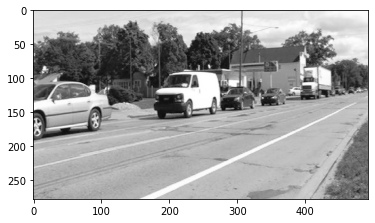
a conv 2D is just the same element by element multiplication and summation.
f1 = np.r_[[[-1,-1], [1,1]]]
print (f1)
c1 = signal.convolve2d(img, f1, mode="valid")
[[-1 -1]
[ 1 1]]
doing manually the first pixel of the resulting img
c1[0,1], (img[:2,:2]*f1).sum()(0.002645502645502562, -0.002645502645502562)and this filter has a border detection effect.
plt.imshow(c1, cmap=plt.cm.Greys_r)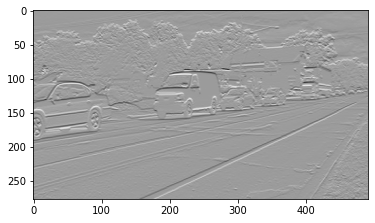
We use abs con convert all differences into positive, since we do not care the direction of edges.
plt.imshow(np.abs(c1), cmap=plt.cm.Greys_r)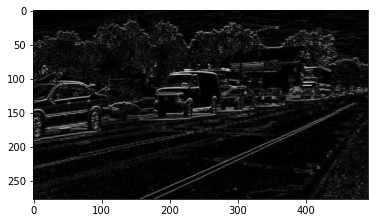
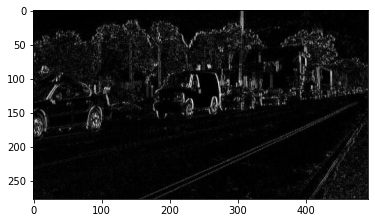
and a filter for vertical edge detection
f2 = np.r_[[[1,-1], [1,-1]]]
print(f)
c2 = signal.convolve2d(img, f2, mode="valid")
plt.imshow(np.abs(c2), cmap=plt.cm.Greys_r)
[[ 1 -1]
[ 1 -1]]
combining both outputs
plt.imshow(np.abs(c1+c2), cmap=plt.cm.Greys_r)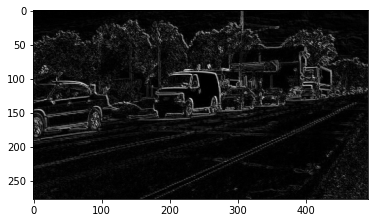
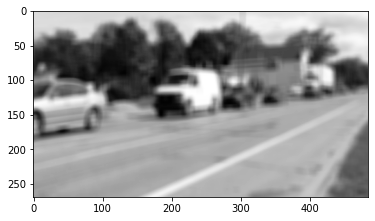
a blurring filter
f = np.ones((10,10))
print(f)
c = signal.convolve2d(img, f, mode="valid")
plt.imshow(np.abs(c), cmap=plt.cm.Greys_r)
[[1. 1. 1. 1. 1. 1. 1. 1. 1. 1.]
[1. 1. 1. 1. 1. 1. 1. 1. 1. 1.]
[1. 1. 1. 1. 1. 1. 1. 1. 1. 1.]
[1. 1. 1. 1. 1. 1. 1. 1. 1. 1.]
[1. 1. 1. 1. 1. 1. 1. 1. 1. 1.]
[1. 1. 1. 1. 1. 1. 1. 1. 1. 1.]
[1. 1. 1. 1. 1. 1. 1. 1. 1. 1.]
[1. 1. 1. 1. 1. 1. 1. 1. 1. 1.]
[1. 1. 1. 1. 1. 1. 1. 1. 1. 1.]
[1. 1. 1. 1. 1. 1. 1. 1. 1. 1.]]
In Tensorflow in just the same
TF usually expects an array of imgs of shape
(n_imgs, pixels_width, pixels_height, n_channels)# reshape image
img = imread("local/imgs/cars-driving.jpg").mean(axis=2)
img = (img-np.min(img))/(np.max(img)-np.min(img)) # normalize to 0,1
img = img.reshape(1,*img.shape,1)
img.shape(1, 278, 493, 1)we want one filter of size 2x2
c = tf.keras.layers.Conv2D(filters=1, kernel_size=2, activation="linear", padding="same")
c.build(input_shape=(img.shape))
for w in c.weights:
print (w)<tf.Variable 'kernel:0' shape=(2, 2, 1, 1) dtype=float32, numpy=
array([[[[-0.45081097]],
[[ 0.6782841 ]]],
[[[ 0.31860155]],
[[-0.4256522 ]]]], dtype=float32)>
<tf.Variable 'bias:0' shape=(1,) dtype=float32, numpy=array([0.], dtype=float32)>
manually set the filter values
c.set_weights([ np.r_[[[-1,-1], [1,1]]].reshape(2,2,1,1), np.r_[0]])cimg = c(img)
cimg.shapeTensorShape([1, 278, 493, 1])cimg[0,0,0]<tf.Tensor: shape=(1,), dtype=float32, numpy=array([-0.00264549], dtype=float32)>plt.imshow(np.abs(cimg.numpy()[0,:,:,0]), cmap=plt.cm.Greys_r)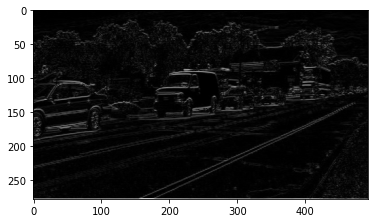
cimg[0,0,0]<tf.Tensor: shape=(1,), dtype=float32, numpy=array([-0.00264549], dtype=float32)>(img[0,:2,:2,0]*np.r_[[[-1,-1], [1,1]]]).sum()-0.002645502645502562activations are simply applied to the output. Observe how a relu activation with an horizontal edge detection filter detects edges in one direction
c = tf.keras.layers.Conv2D(filters=1, kernel_size=2, activation="relu", padding="valid")
c.build(input_shape=(img.shape))
c.set_weights([ np.r_[[[-1,-1], [1,1]]].reshape(2,2,1,1), np.r_[0]])
plt.imshow(c(img).numpy()[0,:,:,0], cmap=plt.cm.Greys_r)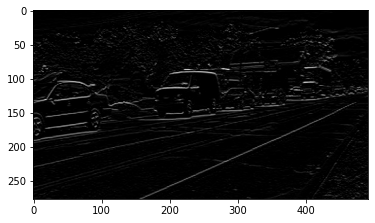
or the other direcction inverting the filter
c = tf.keras.layers.Conv2D(filters=1, kernel_size=2, activation="relu", padding="valid")
c.build(input_shape=(img.shape))
c.set_weights([ np.r_[[[1,1], [-1,-1]]].reshape(2,2,1,1), np.r_[0]])
plt.imshow(c(img).numpy()[0,:,:,0], cmap=plt.cm.Greys_r)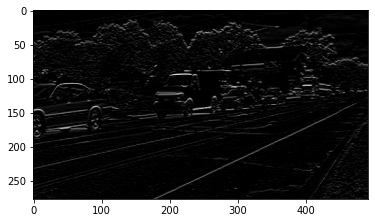
for color images, filters also have to have three channels
img = imread("local/imgs/cars-driving.jpg")
img = (img-np.min(img))/(np.max(img)-np.min(img)) # normalize to 0,1
img = img.reshape(1, *img.shape)
plt.imshow(img[0])
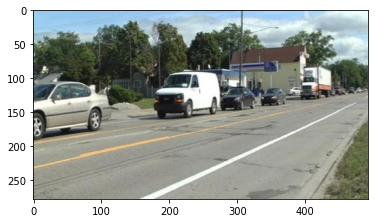
f = -np.ones((3,3,3))*1.5
f[:,:,0] = 1.5
f
array([[[ 1.5, -1.5, -1.5],
[ 1.5, -1.5, -1.5],
[ 1.5, -1.5, -1.5]],
[[ 1.5, -1.5, -1.5],
[ 1.5, -1.5, -1.5],
[ 1.5, -1.5, -1.5]],
[[ 1.5, -1.5, -1.5],
[ 1.5, -1.5, -1.5],
[ 1.5, -1.5, -1.5]]])c = tf.keras.layers.Conv2D(filters=1, kernel_size=3, activation="sigmoid", padding="valid")
c.build(input_shape=(img.shape))
c.set_weights([ f.reshape(3,3,3,1), np.r_[0]])cimg = c(img).numpy()
cimg.shape(1, 276, 491, 1)observe how very pure red is detected (hand crafted filter is difficult to tune)
plt.figure(figsize=(15,10))
plt.subplot(121); plt.imshow(img[0,:,:]); plt.axis("off")
plt.subplot(122); plt.imshow(cimg[0,:,:,0], cmap=plt.cm.Greys); plt.axis("off")
(-0.5, 490.5, 275.5, -0.5)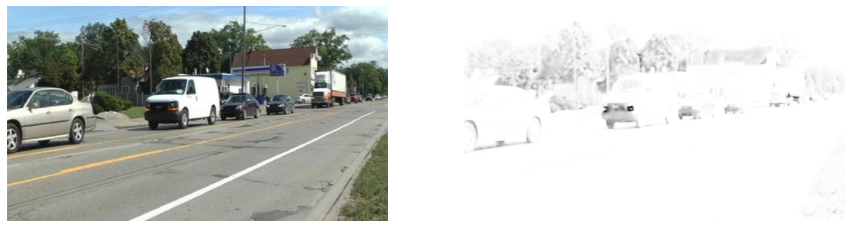
detect green (little)
f = -np.ones((3,3,3))*1.5
f[:,:,1] = 1.5
c.set_weights([ f.reshape(3,3,3,1), np.r_[0]])
plt.figure(figsize=(15,10))
cimg = c(img).numpy()

plt.subplot(121); plt.imshow(img[0,:,:]); plt.axis("off")
plt.subplot(122); plt.imshow(cimg[0,:,:,0], cmap=plt.cm.Greys); plt.axis("off")
(-0.5, 490.5, 275.5, -0.5)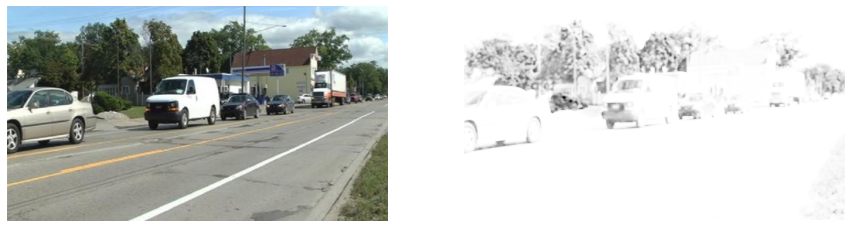
detect blue (little tolerace)
f = -np.ones((3,3,3))*1.5
f[:,:,2] = 1.5
c.set_weights([ f.reshape(3,3,3,1), np.r_[0]])
plt.figure(figsize=(15,10))
cimg = c(img).numpy()

plt.subplot(121); plt.imshow(img[0,:,:]); plt.axis("off")
plt.subplot(122); plt.imshow(cimg[0,:,:,0], cmap=plt.cm.Greys); plt.axis("off")
(-0.5, 490.5, 275.5, -0.5)